
Start here
ThimbleDB Studio
ThimbleDB Studio is an optional management frontend shipped in the
thimbledb npm package. It runs against the same application authority and
uses the same OIDC sessions, CSRF checks, scope grants, browser keys, layouts,
and indexes as application code.
Studio never receives object-storage credentials or an authority write key.
The thimble.admin role enables administrative operations but does not grant
access to every data scope.
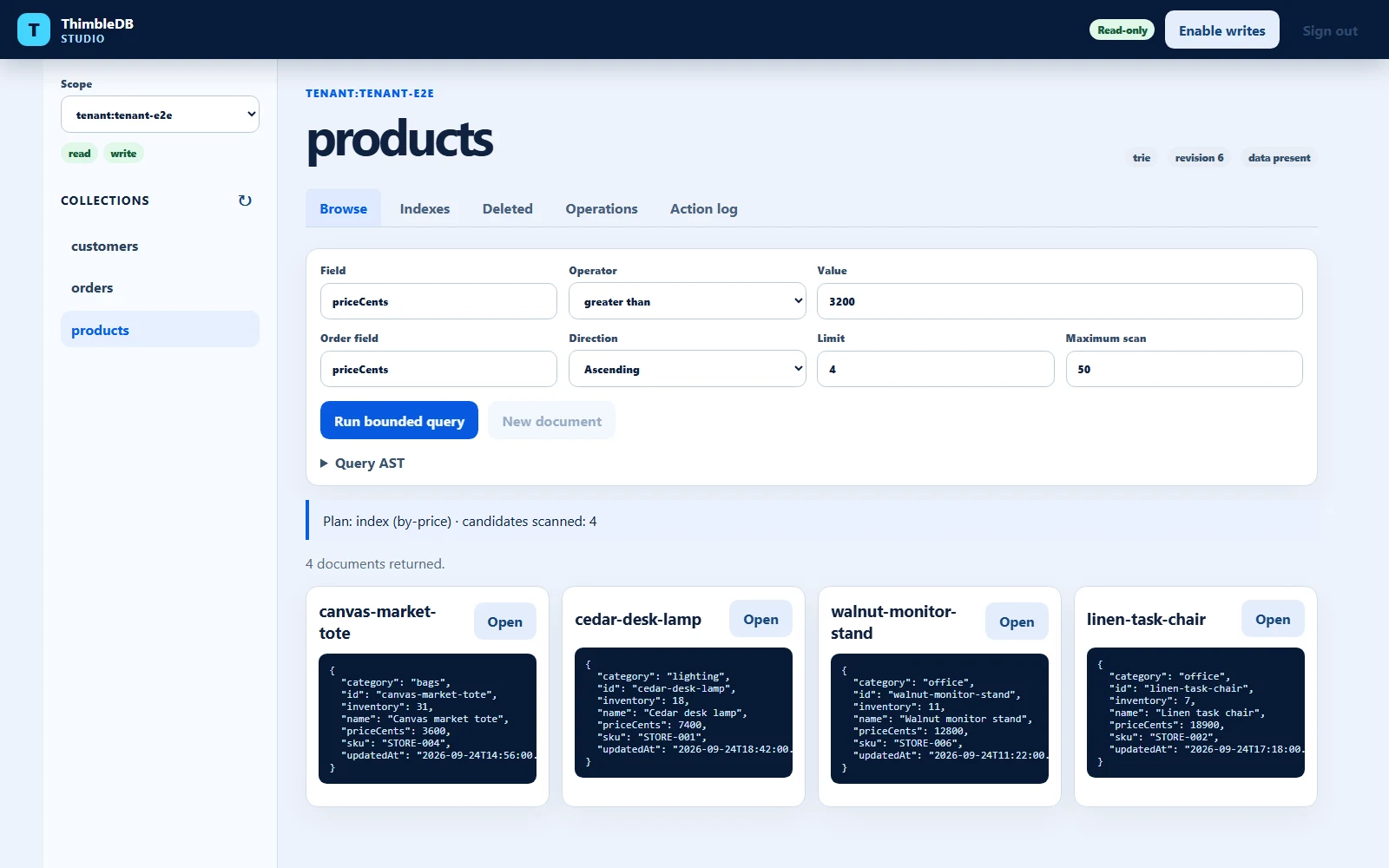
The screenshot uses demo data. Studio remains read-only until the selected scope ID is explicitly confirmed for that browser session.
Capabilities
Studio provides:
- OIDC and local-development sign-in
- explicit scope selection with visible permissions
- authority-declared collection discovery
- document browsing through bounded queries
- point, index, and scan plan display
- collection layout, revision, and index-health details
- JSON document creation and editing
- retained deletion and restore
- deterministic checksummed NDJSON export
- configured secondary-index rebuild
- expired tombstone purge
- a downloadable browser-session action log
The action log is not a durable server audit trail.
Read-only by default
Every Studio session begins in read-only mode. A user must type the selected scope ID before mutation controls are enabled for that browser session.
The authority still enforces permissions:
- browsing, query, deleted-document listing, and export require
read - document writes, deletion, and restore require
write - Studio index rebuild and deletion purge require
thimble.adminplus explicitwriteaccess to the selected scope - index rebuild also requires authority maintenance mode
An administrator cannot select or operate on an ungranted user or tenant scope.
Node authority hosting
Enable Studio through code:
import {
  startNodeAuthority,
} from "thimbledb/authority/node";

await startNodeAuthority({
  studio: true,
  studioOrigin: "https://database.example.com",
  collections: ["notes", "settings"],
  collectionLayouts,
  collectionIndexes,
});
Or use environment settings:
$env:THIMBLE_STUDIO = "true"
$env:THIMBLE_STUDIO_ORIGIN = "https://database.example.com"
$env:THIMBLE_COLLECTIONS = "notes,settings"
Open:
https://database.example.com/studio/The Node authority serves the Studio assets included in the installed npm package. Local authorities default the Studio origin to their own loopback host and port.
Serve or proxy the application and Studio through the same browser origin.
Browser cache storage and logout coordination are origin-scoped. The generated
starter proxies both /api and /studio through Vite during development.
Cloudflare hosting
Enable the Studio API in the Worker:
import {
  createCloudflareAuthority,
} from "thimbledb/authority/cloudflare";

export default createCloudflareAuthority({
  studio: true,
  studioOrigin: "https://database.example.com",
  collections: ["notes", "settings"],
  collectionLayouts,
  collectionIndexes,
});
Build the host application, then copy the package-owned assets into the Worker
asset directory under studio. For the repository’s reference Wrangler
configuration:
npm run build:client-assetsAn application whose Wrangler asset directory is dist would instead use
dist\studio.
The Worker should use run_worker_first: true so /api/* requests reach the
authority before static asset fallback.
Environment-only configuration can use:
THIMBLE_STUDIO=true
THIMBLE_STUDIO_ORIGIN=https://database.example.com
THIMBLE_COLLECTIONS=notes,settings
THIMBLE_STUDIO_ORIGIN is an additional exact origin accepted for
state-changing Studio requests. Do not use a wildcard.
Collection discovery and limits
Studio combines:
- the authority’s explicit
collectionsoption orTHIMBLE_COLLECTIONSlist - code or environment-configured collection layouts
- configured index definitions
This bounded catalog avoids scanning every object in storage. It never lists another scope. Collections that use the default trie layout and have no indexes must be named explicitly:
await startNodeAuthority({
  studio: true,
  collections: ["notes", "settings"],
});
Safety bounds:
- collection metadata is loaded in pages of at most 20 collections
- deep index validation loads one index at a time
- index health refuses pages above 4 MiB
- deleted-document listing stops above 1,000 tombstones
- snapshot deleted-document and export reads reject from authenticated HEAD metadata before downloading pages above 16 MiB
- trie deleted-document and export reads reject from authenticated branch metadata before loading leaves above 16 MiB
- one Studio export stops above 10,000 stored documents
- normal queries retain their configured
maxScanDocumentsbound
Use the CLI migration tools for larger exports.
Upgrade existing collections
Collections written before version 3 do not contain authenticated snapshot or trie size metadata. Normal point reads remain compatible, and version 2 readers continue following trie child hashes.
Before using bounded Studio scans, deleted-item listing, export, or index rebuild on an existing collection:
$env:THIMBLE_MIGRATION_QUIESCENT = "true"
$env:THIMBLE_SCOPE_ID = "user:<id>"
$env:THIMBLE_COLLECTIONS = "notes,settings"
$env:THIMBLE_COLLECTION_LAYOUTS = "notes=snapshot,settings=trie"
$env:THIMBLE_COLLECTION_INDEXES = '{"notes":[{"name":"by-title","fields":["title"],"mode":"equality"}]}'
npx thimbledb migrate-metadata
Supply the complete active index configuration for indexed collections. The migration rewrites the same stored records and verifies full equality.
Index maintenance
Studio displays each configured index as:
readyemptymissingmismatch
Applying configured indexes is an explicit maintenance operation. It may add, remove, or redefine index pages while preserving and verifying every stored record. Ordinary writes and other maintenance paths refuse index-set drift.
Export format
Studio downloads one collection as deterministic NDJSON. Response headers include:
- record count
- SHA-256 checksum
The export contains plaintext application data. Protect it like any database export and remove it after use.
For multi-collection archives, imports, dry runs, and external database adapters, use Logical migration.
Deliberate limits
Studio is not:
- a SQL console
- a storage-account browser
- a cross-scope search engine
- an unrestricted administrator bypass
- a durable audit service
- a replacement for provider backup and monitoring
It is a management view over documented ThimbleDB authority capabilities.